
Every time an app opens instantly, downloads run quietly in the background, or a system stays responsive under pressure, something important is happening behind the scenes.
Most users never see it, yet it shapes how technology feels during everyday use.
Behind every smooth click or sudden freeze lies a system making split-second decisions about how tasks should run efficiently.
That hidden balance often comes down to process vs thread, a concept that quietly decides which tasks work together or stay safely apart inside a system.
It connects directly to common moments like apps freezing, systems slowing down, or software running flawlessly without interruption.
This blog discusses the fundamental differences between processes and threads, including their definitions and use cases, to learn how systems truly work.
What is a Process?
It is a running instance of a program that the operating system manages as a separate unit.
When an application is opened, the system creates a process so the program can execute instructions, use memory, and interact with hardware.
Each process works independently and has its own memory space, which means data used by one process cannot be accessed directly by another, which maintains system stability.
A process also controls its own execution flow, including program counters and system resources such as files, network connections, and CPU time.
Because of this isolation, if one process stops or crashes, other processes usually continue running without impact.
Understanding process vs thread helps decide the right approach based on application needs and system behavior.
Understanding a Thread
A thread is the smallest unit of execution within a process and allows a program to perform multiple tasks at the same time.
Instead of running as a separate program, a thread exists inside a process and shares the same memory and system resources with other threads in that process.
This shared environment makes threads lightweight and faster to create compared to processes.
Threads can communicate quickly with each other because they use the same address space, which improves performance in many applications.
However, threads depend entirely on the parent process for their existence, and if the process stops, all threads inside it also stop.
Difference Between Process vs Thread
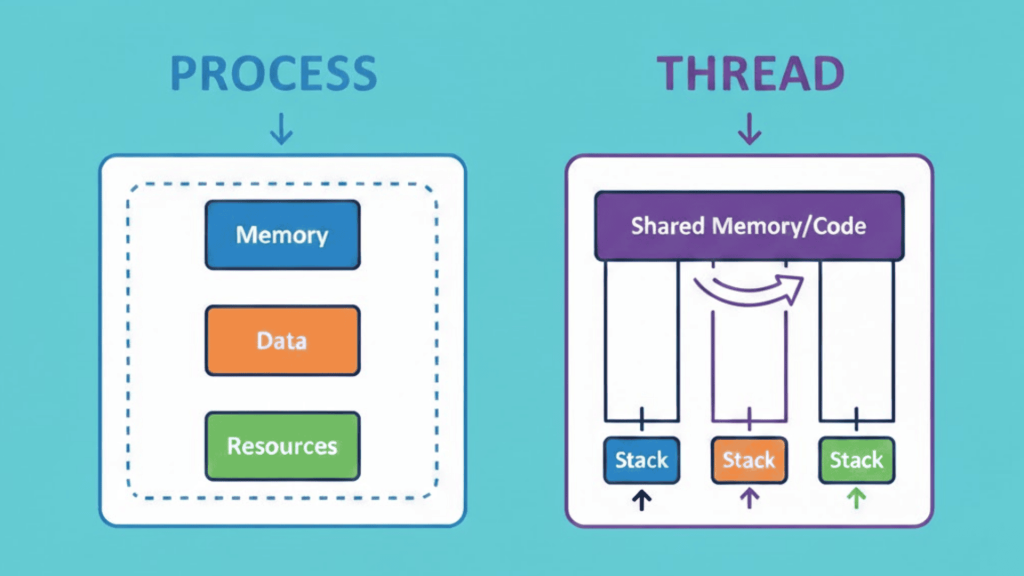
Both allow programs to run and perform tasks, but they behave very differently behind the scenes. It is important to choose the right approach based on application needs and goals.
1. Memory Management
A process has its own isolated memory space that is separate from other processes.
This means one process cannot directly access or change the data of another process. This isolation improves safety and prevents accidental interference.
A thread shares the same memory space with other threads inside the same process.
Because of this shared memory, threads can access the same data easily, but they must be careful to avoid conflicts or data corruption when multiple threads modify the same information.
2. Resource Usage
Processes require more system resources because each process needs its own memory space and system information, which highlights a key difference in process vs thread behavior.
Creating a process takes more time and effort from the operating system.
Threads are lighter and use fewer resources since they share memory and system resources with the parent process.
Resource sharing allows threads to work efficiently, but it also means errors in one thread can affect others within the same process.
3. Communication
Communication between processes is slower and more complex because they do not share memory, which adds overhead but improves safety.
The operating system must use special methods, like pipes or messages, to allow data exchange.
Threads communicate much faster because they share the same memory space. They can pass data directly without extra system steps.
While this improves speed, it also requires careful coordination to avoid data conflicts when multiple threads access the same data at the same time.
4. Execution Speed
Threads usually start faster than processes because they do not need separate memory allocation or full system setup.
Switching between threads is also quicker since the operating system does not have to change memory spaces, which reduces overhead and improves overall execution efficiency.
Processes take more time to start and switch because each one runs in its own environment.
This difference between process vs thread makes threads a better option for tasks that need quick execution and frequent switching, such as responsive user interfaces.
5. Stability and Safety
Processes offer better stability because a crash in one process usually does not affect other processes running on the system.
Each process is isolated, which helps protect the system from widespread failure.
Threads do not provide the same level of protection. If one thread crashes or behaves incorrectly, it can impact the entire process and all other threads within it.
This makes thread management more sensitive and requires careful handling.
Process vs Thread in Operating Systems
Operating systems use both processes and threads to manage how programs run and share system resources efficiently.
A process provides a safe and isolated environment where a program can execute without interfering with other programs.
Threads allow multiple tasks to run within that process at the same time, improving performance and responsiveness across operating environments.
Modern operating systems schedule processes and threads using the CPU.
Processes help maintain stability and security, while threads help applications run faster by handling parallel work. Both exist together because they solve different problems.
Processes focus on separation and protection, while threads focus on speed and task handling.
By combining both, operating systems can support multitasking, responsive applications, and reliable system behavior without sacrificing performance or safety.
Process vs Thread: At a Quick Glance
These concepts are used in operating systems to manage how programs run. It sets the foundation for understanding how tasks are executed, organized, and controlled by the system.
| Aspect | Process | Thread |
|---|---|---|
| Basic meaning | A running instance of a program | A unit of execution inside a process |
| Creation cost | Takes more time and system effort | Faster and lighter to create |
| Termination time | Slower to terminate due to cleanup | Faster to terminate |
| Lifetime | Exists as long as the program runs | Depends on the parent process |
| Crash impact | Usually affects only that process | Can affect the entire process |
| Use case | Independent and secure applications | Parallel and performance-focused tasks |
When to Use: Process vs Thread
Choosing between process vs thread depends on isolation and stability, or speed and resource sharing is the priority.
A process is better suited for running independent applications that require strong isolation, improved security, or protection from crashes.
Separate processes work well for tasks that must not interfere with each other, such as running multiple programs or handling sensitive operations.
Threads are a better choice for performance-driven scenarios where responsiveness matters.
Threads work efficiently for parallel tasks, background operations, and situations where multiple activities need to run at the same time within a single application.
Common examples include loading data in the background while a user interface remains responsive or performing calculations alongside user input.
Process vs Threads vs Program
A program, a process, and a thread are closely related but serve different purposes in computing.
Each concept plays a role in how software runs daily across modern systems and devices.
A program is a set of instructions stored on disk, such as an application file, and it does nothing until it is started. When a program runs, it becomes a process.
A process is an active execution of that program, managed by the operating system with its own memory and resources. Inside a process, threads are created to handle tasks.
A thread is the smallest unit of execution and works within a process to perform work efficiently.
A program is passive, a process is active and independent, and threads are lightweight workers that allow a process to perform multiple tasks at the same time smoothly.
Conclusion
Modern operating systems use processes and threads as core task management mechanisms to handle execution, multitasking, stability, and responsiveness.
A process represents a running program with its own memory and system resources, which helps maintain isolation and control.
A thread operates within a process and focuses on handling tasks efficiently by sharing memory and resources. The key difference lies in separation versus performance.
Processes are better suited for independent execution and stronger safety, while threads support parallel work and faster response within an application.
Knowing how each works makes system behavior easier to understand and design choices more practical for building efficient and reliable software applications.
Still unsure about when to use process vs threads? Comment down below, and let’s break it down together.