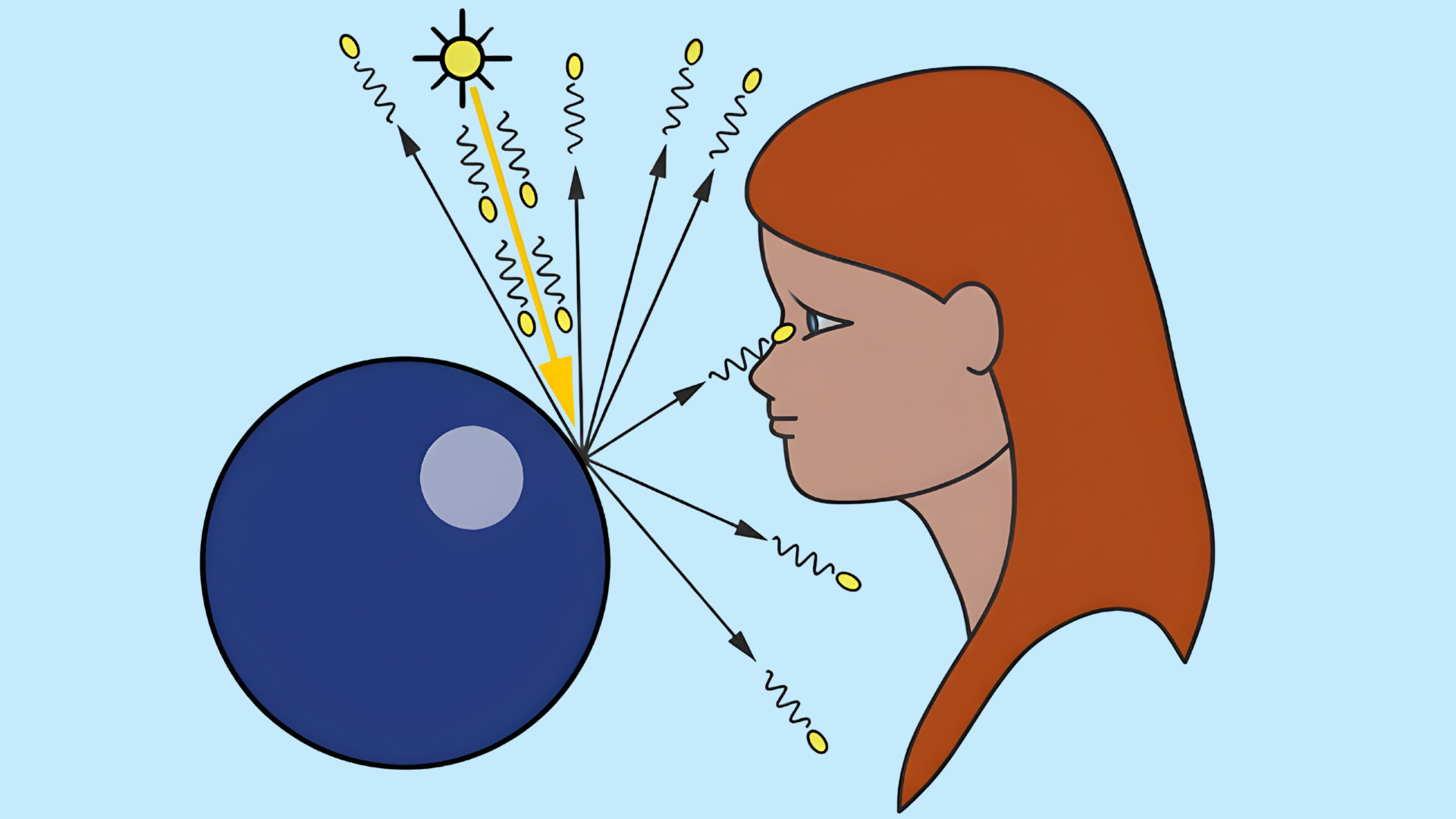
Why do some digital visuals feel closer to real life than others?
While researching visual rendering techniques, I realized there is a lot happening behind the scenes that most people never notice.
This blog is my way of sharing what I learned and what still surprised me along the way.
Instead of giving answers upfront, we are going to uncover how light, surfaces, and calculations shape what we see on screen.
Let’s look at ideas, not instructions, and focus on clarity rather than jargon. If you are curious about how realism is achieved in 3d computer graphics, this post sets the stage for that discussion.
Think of this as a starting point, where questions matter more than conclusions, and where understanding grows step by step as we move forward.
What are 3D Computer Graphics?
3D computer graphics refer to visual content created using mathematical representations of three-dimensional objects within a digital space.
These visuals simulate depth, height, and width, allowing scenes to appear realistic or stylized depending on design goals.
Objects are built from points, edges, and surfaces, then shaped using models that define form and structure. Lighting, texture, and perspective are applied to give surfaces detail and spatial accuracy.
This field is widely used in films, video games, product design, architecture, education, and simulations.
Unlike flat images, three-dimensional visuals can be viewed from multiple angles and animated over time. The process combines art and computation, requiring both creative planning and technical precision.
How Ray-Tracing Works in 3D Computer Graphics?
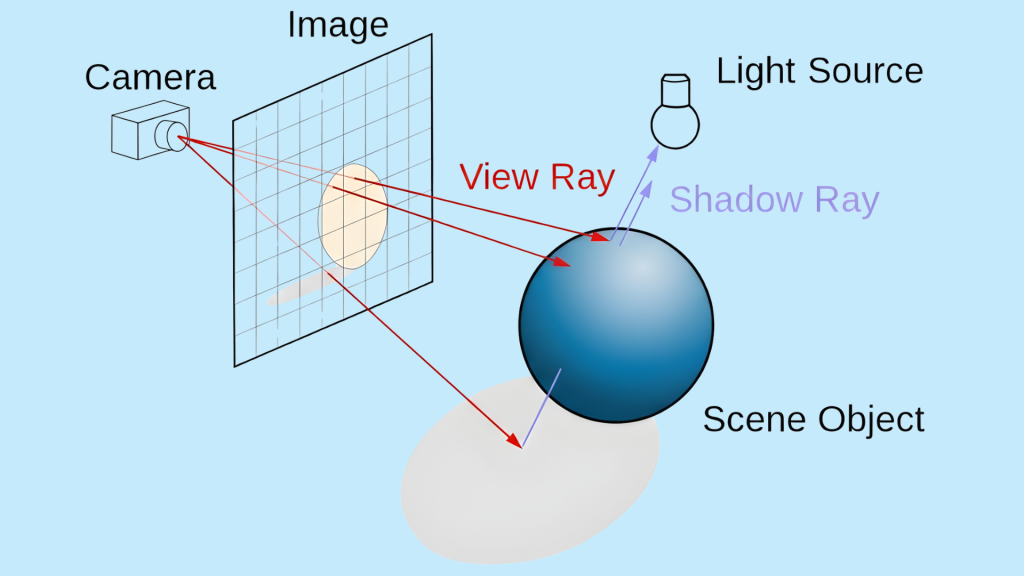
Ray-tracing is a rendering technique used to simulate how light behaves in a digital scene.
It works by sending virtual rays from a camera viewpoint into a scene and tracking how those rays interact with objects they encounter.
When a ray hits a surface, calculations determine reflection, refraction, absorption, or shadowing based on the material properties.
This process is repeated as rays bounce between surfaces or pass through transparent objects.
In 3d computer graphics, ray-tracing helps produce realistic lighting effects such as soft shadows, accurate reflections, and natural color blending.
Although it requires more computing power than simpler methods, modern hardware and optimization techniques have made it more practical.
Key Components of the Ray-Tracing Algorithm
Core elements explain how light paths are calculated, surfaces are evaluated, and visual realism is produced through mathematical processing steps.
- Ray Generation: Creates primary rays from the camera into the scene, defining viewing direction and starting points for all light interaction calculations.
- Intersection Testing: Determines where rays hit objects by checking geometry, enabling the system to identify visible surfaces and depth relationships accurately.
- Shading Model: Calculates surface color using material properties, light sources, and angles, deciding how bright, reflective, or transparent each point appears.
- Shadow Rays: Sends additional rays toward light sources to check obstructions, helping decide whether a surface point is illuminated or shadowed.
- Recursive Ray Tracing: Handles reflections and refractions by spawning new rays after impacts, allowing complex light behavior across multiple surface interactions.
Essential Tools and Software for Ray-Tracing
Key software and platforms help create, test, and render ray-traced visuals efficiently across creative, technical, and real-time production workflows and pipelines.
- Blender: Open-source 3D creation suite offering built-in ray-tracing through Cycles, supporting realistic lighting, materials, animations, and rendering workflows for artists, designers, and professionals.
- Unreal Engine: Real-time game engine with hardware ray-tracing support, enabling dynamic lighting, reflections, and shadows for interactive scenes and virtual environments projects applications.
- NVIDIA OptiX: NVIDIA OptiX provides GPU-accelerated ray-tracing APIs that improve performance, reduce noise, and support advanced rendering pipelines for developers and studio teams.
- Autodesk Arnold: Autodesk Arnold is a high-quality ray-tracing renderer used in film and animation for consistent lighting, shading accuracy, and predictable results.
- Unity: Unity supports ray-tracing through a high-definition render pipeline, allowing developers to combine real-time performance with enhanced visual realism in modern interactive applications.
Practical Applications of Ray-Tracing
Practical ray tracing enables realistic lighting, reflections, and shadows across industries, improving visual accuracy, simulations, and decision-making workflows worldwide today.
- Creates realistic lighting and reflections in video games
- Improves shadow accuracy and visuals in film production
- Shows real materials and daylight in building designs
- Tests product materials before physical manufacturing starts
- Supports medical imaging with accurate light simulations
Ray tracing continues to shape modern industries by improving realism and accuracy across digital workflows.
It helps teams visualize ideas clearly, test designs early, reduce costly mistakes, and deliver better results in gaming, film, architecture, product design, and medical training environments worldwide today.
Pros and Cons of Ray-Tracing in 3D Computer Graphics
Below is a concise comparison highlighting the main advantages and limitations of ray-tracing, focusing on performance, realism, and practical use in modern rendering workflows.
| Pros | Cons |
|---|---|
| Produces highly realistic lighting and shadows | Requires high computational power |
| Accurate reflections and refractions | Slower rendering compared to rasterization |
| Improves visual depth and realism | Demands advanced hardware support |
| Natural color blending between surfaces | Higher energy consumption |
| Better material representation | Increased development complexity |
| Enhances cinematic visual quality | Not ideal for low-end devices |
| Reduces lighting approximation errors | Longer render times for complex scenes |
| Supports physically accurate visuals | Limited performance in real-time scenarios |
Future of Ray-Tracing in 3D Computer Graphics
The future of ray-tracing is closely tied to advances in hardware, software optimization, and rendering techniques.
As graphics processors become more powerful, real-time ray-tracing is expected to improve in speed and efficiency.
Smarter algorithms and AI-based denoising will reduce performance costs while maintaining visual quality. Game engines and creative tools are already integrating hybrid approaches that balance realism and speed.
In 3d computer graphics, ray-tracing is likely to become a standard feature rather than a premium option.
Wider adoption will also influence education, simulations, and virtual environments.
As accessibility increases, more creators will be able to use accurate lighting without a complex setup.
These developments suggest a shift toward more natural visuals across interactive and non-interactive media, shaping how digital scenes are designed, rendered, and experienced in the coming years.
Conclusion
Now you have a fair knowledge about how ray-tracing fits into modern visual creation and why it plays such an important role.
I aimed to connect concepts clearly so the overall picture feels complete rather than fragmented.
With this understanding, you can now decide which rendering approach aligns best with your goals and expectations.
The discussion leads to informed choices, not assumptions, and gives context to ongoing changes in 3d computer graphics.
This conclusion marks the point where explanation turns into clarity and preparation.
Take what you learned, reflect on it, and move forward with confidence. Want to keep the conversation going or share a different perspective?
Drop a comment below, add your thoughts, and join others discussing where visual realism is heading next across future creative and technical fields.
Frequently Asked Questions
What Hardware Do You Need for Ray-Tracing?
Ray-tracing needs a modern GPU with ray-tracing support, a capable CPU, enough RAM, and updated drivers for stable performance.
How Does Ray-Tracing Differ from Ray Casting?
Ray casting checks object visibility, while ray-tracing simulates light paths, reflections, shadows, and realistic lighting interactions.
Can Older Graphics Cards Support Ray-Tracing?
Older graphics cards may support ray-tracing through software, but performance is limited and often unsuitable for real-time rendering.