The Asus ProArt PX13 is a compact professional laptop designed for users who need reliable performance, accurate visuals, and a polished build in a lightweight, portable body.
It is built for people who work with demanding applications and cannot afford hardware inconsistencies.
This laptop is aimed at production-focused environments where stability and precision matter every day.
As part of the ProArt series, it is developed for creators, designers, and professionals who depend on consistent specifications rather than consumer-focused features.
The focus remains on display accuracy, efficient processing, and dependable long-term use.
This article explains the device’s specifications in a clear and structured format.
All key technical details are presented in one place to help readers understand what the system offers before making a purchase decision.
Asus ProArt PX13 Overview
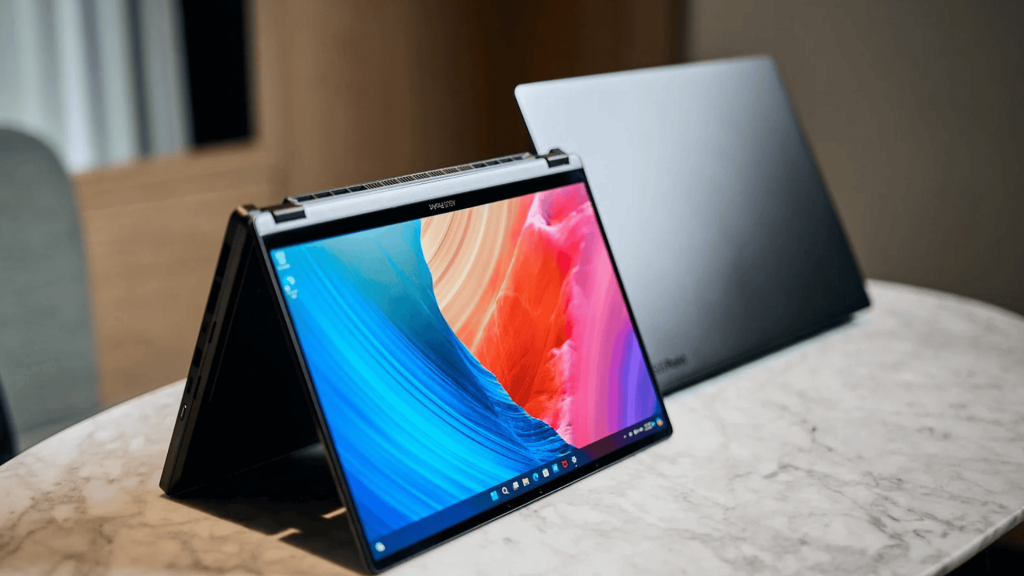
The Asus ProArt PX13 is positioned as a precision-driven laptop built for professional production tasks where hardware accuracy and consistency matter.
It is designed for users who depend on stable performance across creative and content-focused applications.
As part of the ProArt series, this model prioritizes certified components, controlled thermal behavior, and display accuracy suited for professional visual work.
It targets users working with design tools, media production software, 3D assets, and color-sensitive workflows.
Asus ProArt PX13: Key Features
The following features outline what defines this laptop as a professional-focused system designed for creative and production-oriented workloads.
1. Design and Build Quality
The ProArt PX13 features a 13.3-inch OLED display with a sharp 3K resolution of 2880 × 1800 and a 16:10 aspect ratio, offering extra vertical space for creative work.
OLED technology provides deep contrast and rich blacks, while brightness reaches up to 400 nits typically and 500 nits in HDR.
The display supports a 60Hz refresh rate and carries VESA DisplayHDR True Black 500 certification for enhanced visual depth.
2. Display Specifications
The laptop features a 13.3-inch OLED display designed with creative accuracy in mind.
The panel delivers deep contrast levels, consistent brightness, and sharp detail, which are essential for visual tasks such as photo editing, design work, and media production.
With a high-resolution output and a refresh rate tuned for creative workflows, the display supports smooth on-screen motion and precise visual control.
Factory calibration and full DCI P3 color coverage help ensure reliable color reproduction, reducing the need for external calibration tools during professional use.
3. Thermal and System Optimization
A professional-grade thermal design supports stable system behavior under extended workloads.
The cooling solution is engineered to manage heat efficiently when the processor and graphics components are under sustained demand, such as during rendering or long editing sessions.
System-level optimization tools further help balance performance and power use.
These tools allow the hardware to maintain consistent output while minimizing unnecessary thermal buildup, supporting long working hours without frequent performance drops.
4. Battery and Power
The system includes a battery rated at approximately 73 Wh, designed to support a balance between portability and performance-oriented hardware.
Battery life varies by workload, but official estimates indicate support for extended mixed use, including creative applications and media playback.
Power delivery is handled through USB-C charging with high-wattage support.
This allows faster charging when paired with the included adapter and offers flexibility for charging through compatible power sources while traveling or working remotely.
5. Camera, Audio, and Microphones
A 2-megapixel webcam with infrared support is included for secure facial recognition via supported operating system features.
The camera is optimized for professional video conferencing and remote collaboration, delivering stable image quality under typical indoor lighting conditions.
Audio input is handled by a dual-microphone array that captures a clear voice while reducing background noise.
For output, the integrated dual speaker system is tuned for vocal clarity and balanced sound reproduction, making it suitable for calls, presentations, and media playback.
6. Security and Privacy
A fingerprint sensor integrated into the power button provides quick, secure access, while TPM 2.0 support enables hardware-level data protection and secure system processes.
Privacy controls include a physical webcam shutter that can be closed when the camera is not in use.
This provides an added layer of user control and helps protect against unintended camera access during daily work sessions.
Pros and Cons
The following table highlights the main strengths and limitations of the device based on its design, performance focus, and pricing.
| Pros | Cons |
|---|---|
| High-resolution OLED display with accurate color output | Premium pricing compared to standard laptops |
| Compact and portable design for professional use | Fixed memory limits upgrade options |
| Strong performance with AMD Ryzen AI processors | Limited number of built-in ports |
| Optional Nvidia RTX graphics for creative workloads | High-end configurations are not available in all regions |
| Fast PCIe SSD storage for quick system response | Not ideal for basic office-focused tasks |
Pricing and Value
The Asus ProArt PX13 sits in the premium professional laptop segment, thanks to its display quality, high-performance hardware, and compact 2-in-1 design.
Pricing changes based on the processor, graphics option, and region.
Entry-level models usually start at around USD 2,000, while higher-end versions with Nvidia RTX 4070 graphics can reach USD 2,800 to USD 3,000.
In terms of value, this laptop is well-suited for professionals who depend on accurate visuals, stable performance, and portability for daily creative work.
For users who need these features, the price aligns with what the system delivers.
Since pricing and configurations differ by region, checking authorized Asus retailers helps confirm availability and choose the right model for your needs and budget.
Comparisons With Other ProArt Models
The Asus ProArt PX13 sits between ultra-portable and high-performance ProArt models, offering a strong balance of power and mobility.
| Feature | Asus ProArt PX13 | Asus ProArt PX14 | Other ProArt Variants (PZ13 / P16) |
|---|---|---|---|
| Form factor | 13.3-inch 2-in-1 convertible | 14-inch clamshell | Tablet style or large clamshell |
| Portability | Highly portable, compact build | Less compact, heavier | PZ13 is lighter, P16 is bulkier |
| Performance | Strong CPU with dedicated GPU options | Higher performance ceiling | PZ13 lower power, P16 highest power |
| Creative focus | Balanced editing, drawing, and mobility | Heavy editing and multitasking | PZ13 for light tasks, P16 for studio work |
Who Should Consider the Asus ProArt PX13?
The Asus ProArt PX13 is best suited for creative professionals who require precise hardware output in a compact, portable system.
It is an ideal choice for graphic designers, video editors, photographers, digital illustrators, and professionals working with color-sensitive visual content.
The device aligns well with workflows that depend on accurate color reproduction, stable performance under sustained load, and fast data access.
It supports demanding activities such as photo editing, video production, motion graphics, 3D asset handling, digital illustration, and multitasking across professional software environments.
The combination of an OLED display, capable CPU and GPU options, and fast SSD storage ensures smooth handling of workloads.
Conclusion
The information presented throughout this guide explains what the Asus ProArt PX13 offers, covering its overall purpose, design approach, specifications, available configurations, and pricing.
Each section is structured to help readers understand how this laptop fits professional and creative work requirements without unnecessary complexity.
By reviewing official specifications and configuration details, it becomes easier to identify differences between models.
This reduces the risk of choosing a system that does not match software requirements or performance expectations.
Before making a purchase decision, it is recommended to compare available configurations and check current availability with authorized sellers.
Doing so ensures the selected model meets budget considerations while supporting long-term professional use and daily productivity needs.
Looking for the right ProArt laptop for creative work? Share your thoughts below in the comments.