Every time a computer starts up, opens a file, or responds to a click, something important is already at work behind the scenes, keeping everything running smoothly.
Most people focus on apps and programs, yet rarely stop to think about the system program that actually makes a device function smoothly in daily use.
What is system software, and why does everything depend on it? It is not something users see or interact with directly, but it quietly shapes every digital experience.
It decides how fast a system feels, how stable it remains, and ensures tasks run without interruption or unexpected errors.
That quiet layer of software plays a bigger role than most people expect, and recognizing it changes how everyday devices are viewed, trusted, and understood.
What is System Software & Why is It Important?
It is the core software that allows a computer or device to function properly. It is responsible for managing hardware and creating a foundation on which other software can run.
Unlike apps that users open and interact with, it works quietly in the background and starts running as soon as the device is powered on.
In a computer, the operating system controls how hardware components work together.
It is important as it helps maintain system stability, supports efficient performance, and plays an important role in keeping the system protected from errors and threats during everyday use.
Without it, the CPU, memory, and storage would not know how to perform even basic tasks. It also provides the platform that allows application software to run smoothly.
Security is another key role, as it helps protect the system from errors and potential threats. Updates and maintenance handled by it also help devices stay reliable over time.
How System Software Works?
It starts working the moment a device is turned on. During the booting process, it checks hardware components, loads essential system files, and prepares the system for use.
This happens automatically without any user action. Once the device is running, it continues to work in the background, managing tasks quietly.
It controls how memory is used, decides which processes run first, and ensures programs do not interfere with each other.
It also handles routine operations like saving data, managing power, and responding to input from devices such as keyboards or touchscreens.
All of this happens without being noticed, allowing users to focus on their tasks.
By managing these operations smoothly, it keeps the device stable, responsive, and ready for everyday use.
Types of System Software
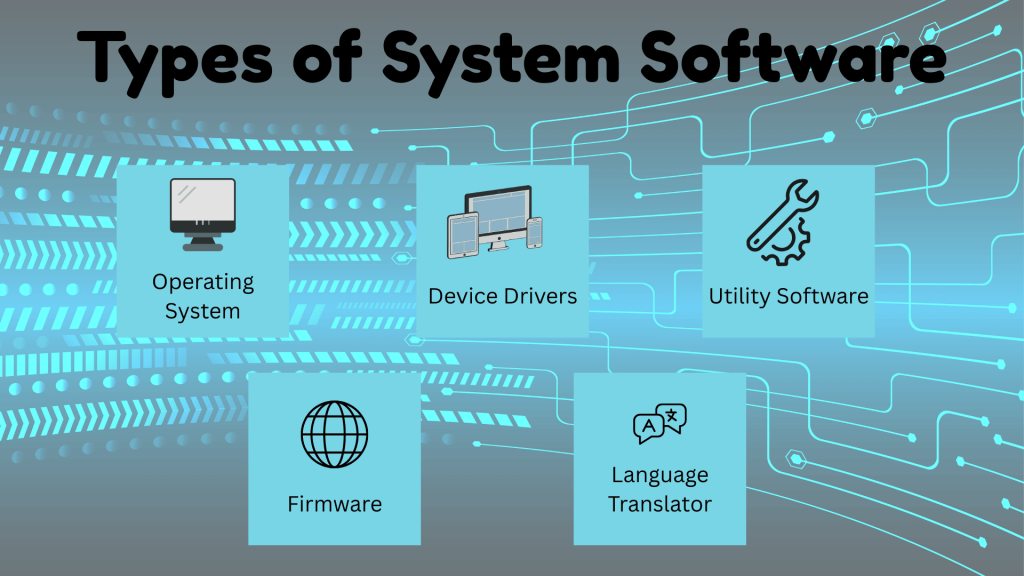
It includes several types of software, and each type has a specific role in keeping a device running smoothly. Some handle daily operations, while others focus on hardware communication.
1. Operating System
It manages hardware like the CPU, memory, and storage, making sure each part is used properly. It also handles files, runs programs, and allows users to interact with the system through menus.
Every task, from opening a file to running an app, depends on the operating system.
These systems differ in design, but all serve the same basic purpose of keeping the device functional.
Example: Windows, macOS, Linux, Android, and iOS.
2. Device Drivers
Device drivers are system software that help hardware devices communicate with the computer.
Without drivers, the system would not understand how to use connected hardware. Each driver acts as a translator between the operating system and a specific device.
When drivers are missing or outdated, hardware may stop working or behave incorrectly, which can affect overall system performance.
Example: A printer driver tells the system how to send print commands, while a keyboard driver helps register keystrokes. Graphics card drivers manage how images appear on the screen.
3. Utility Software
Utility software focuses on maintaining, protecting, and improving system performance. These tools help keep the computer clean, secure, and running efficiently.
Some utilities manage backups, while others help detect errors or optimize storage.
Although utility software often runs quietly, it plays an important role in preventing problems and extending the life of the system by keeping everything in good working condition.
Example: Disk cleanup tools, antivirus programs, and system monitoring tools.
4. Firmware
Firmware is a type of low-level system program built directly into hardware components. It controls how hardware starts up and communicates with other parts of the system.
Firmware runs before the operating system loads and helps initialize essential components.
Unlike other software, firmware is rarely changed and is stored in non-removable memory. Even though users do not interact with it directly, firmware is essential for basic system startup.
Example: BIOS and UEFI, which prepare the system to boot properly.
5. Language Translator
A language translator is a type of system software that converts programs written in one language into another language that a computer can understand.
Computers only process machine language, so translators are needed to run programs written in high-level or assembly languages.
This software reads the source code, checks it for errors, and translates it into machine code.
Example: Compilers, interpreters, and assemblers.
Functions of System Software
It handles the core tasks that allow a computer or device to run smoothly. It works in the background, managing resources and making sure all parts of the system communicate properly.
- Hardware Management: It controls and coordinates hardware components such as the CPU, memory, storage, and input output devices.
- Resource Allocation: It decides how system resources are shared between running tasks, helping programs run efficiently without slowing down the system.
- Process Control: It manages active processes, starting, stopping, and scheduling tasks so the system remains stable and responsive.
- File Management: It organizes, stores, and retrieves data by managing files and folders, making information easy to save and access.
- System Security and Stability: It helps protect the system from errors and threats while maintaining consistent performance.
System Software vs Application Software
Both serve different purposes, but are essential for a computer to work properly. One focuses on managing the system itself, while the other helps users perform specific tasks.
| Basis of Difference | System Software | Application Software |
|---|---|---|
| Purpose | Manages hardware and controls core system operations | Performs specific tasks for users such as writing or browsing |
| Role in System | Acts as the foundation that allows the system to function | Runs on top of the system program to complete user tasks |
| Interaction | Works mostly in the background without direct user input | Directly used and controlled by users |
| Startup | Starts running as soon as the system is powered on | Starts only when the user opens the program |
| Dependency | Can operate without application software | Cannot run without the system program |
| Examples | Operating systems, device drivers, firmware | Word processors, web browsers, media players |
Disadvantages of System Software
It is necessary for a computer to function, but it also has certain drawbacks. These limitations usually appear during updates, errors, or compatibility issues and help set realistic expectations.
- Complexity: The system program is complex by nature, which makes it difficult for regular users to understand or modify without technical knowledge.
- Update Issues: System updates can sometimes cause bugs, slowdowns, or compatibility problems with existing hardware or programs.
- Limited User Control: Users have restricted control over its settings, as incorrect changes can cause system failure.
- Error Impact: A fault in the system program can affect the entire system, leading to crashes or startup problems.
- Resource Usage: Some of it consumes a large amount of memory and processing power, which can affect overall system speed.
Conclusion
Understanding what system software is helps explain why systems work the way they do, as it plays a critical role in how every computer and digital device functions, and
It runs in the background, manages essential resources, and ensures the device stays stable, secure, and responsive at all times.
It quietly handles system operations that users rarely notice but rely on every single day.
Without it, even the most basic tasks would not be possible. It acts as the foundation of all computing systems, supporting everything users see and do on their devices.
Learning about it also makes it easier to understand operating systems, utilities, and other software types that build on this base and improve functionality.
Have experience troubleshooting software issues? Add insight in the comments down below.